Always know the next right document - from first discovery to final sunset

Eight phases, five roles and a governed template library, connected by a workflow graph that shows what each piece of work needs before it and what it unblocks next.

Get StartedHow project context feeds the work
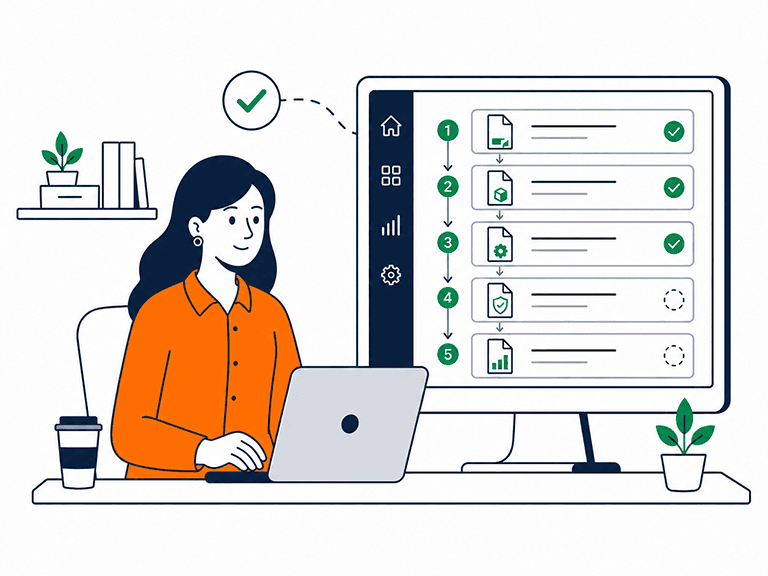
A image of a woman sat at a laptop looking at her entire gensudo product development lifecycle documents organise in one workspace

Organise the entire product lifecycle in one workspace

Gensudo brings the whole product lifecycle - Discover, Validate, Plan, Define, Build, Launch, Optimise, Scale or Sunset - into one connected workspace. 382 governed templates are organised by role and phase, with a workflow graph of 2,102 dependency relationships showing what each document needs before it and what it unlocks next. This gives every project a clear structure from early discovery through delivery and beyond, rather than leaving teams to work out the process for themselves.

An explicit ordered sequence of documents that helps individuals and lean teams work with structure and discipline

Keep product work in the right sequence

Product work rarely fails for lack of effort. It fails when work happens in the wrong order — a roadmap before discovery, launch planning while validation questions remain unanswered, or a sunset decision without the business case behind it. Experienced product leaders often carry the correct sequence in their heads. Gensudo makes that sequence explicit, helping individuals and lean teams work with the structure and discipline of an experienced product organisation.

How the workspace guides a project

  1. 1

    Set your role

    Choose from five roles — Head of Product, Product Director, Product Manager, Product Owner or Creative Director. Each sees a template library shaped to its remit, with its own AI drafting persona behind it.

  2. 2

    Work phase by phase

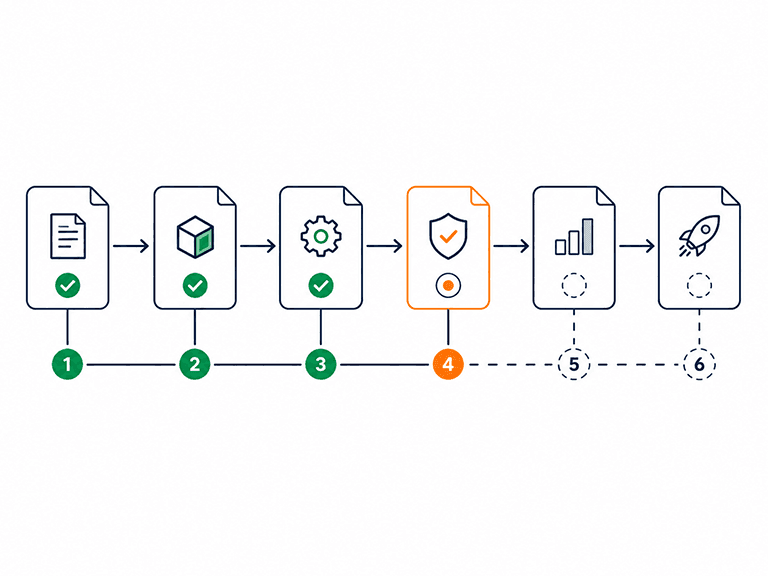
    The eight phases run Discover, Validate, Plan, Define, Build, Launch, Optimise, and Scale or Sunset. Every phase holds the templates that phase actually calls for — 58 documents across roles in Discover alone, 85 in Plan.

  3. 3

    Follow the workflow graph

    2,102 dependency edges across 39 stages connect the library. Open any document and see what it needs before it and what it unblocks next — the order of operations, made visible.

  4. 4

    Choose the view that fits the moment

    Dashboard for the overview, kanban for flow, timeline and calendar for sequencing, and a flow view for the dependency graph itself. Same work, five ways to see it.

  5. 5

    Draw on the guidance in every template

    Each of the 382 templates explains why this document matters now, who should sign it off, and what good looks like — with per-section prompts as you work. Mentorship, embedded where the work happens.

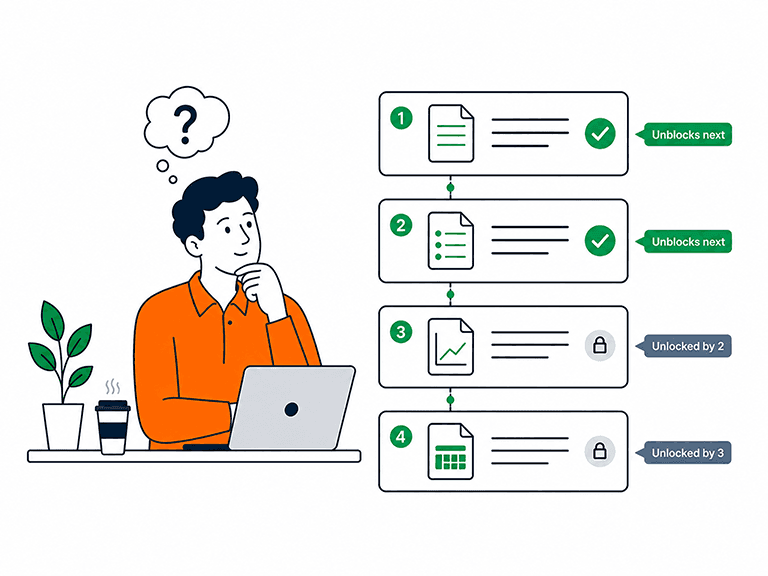
man sat at a laptop thinking what to work on next while looking at a sequence of documents showing whats needed-before and unblocks-next visible on every document

2,102 edges encode the order experienced leaders keep in their heads

A Business Case wants a Market Research Report before it; a Product Roadmap unblocks the planning documents downstream of it. The workflow graph records these relationships across 39 stages - needs-before and unblocks-next - so the question 'what should I work on?' always has a grounded answer, whichever of the eight phases you are in.

  • 382 governed templates organised role × phase
  • 2,102 dependency edges across 39 stages
  • Needs-before and unblocks-next visible on every document
  • Phase coverage from Discover through to Scale or Sunset
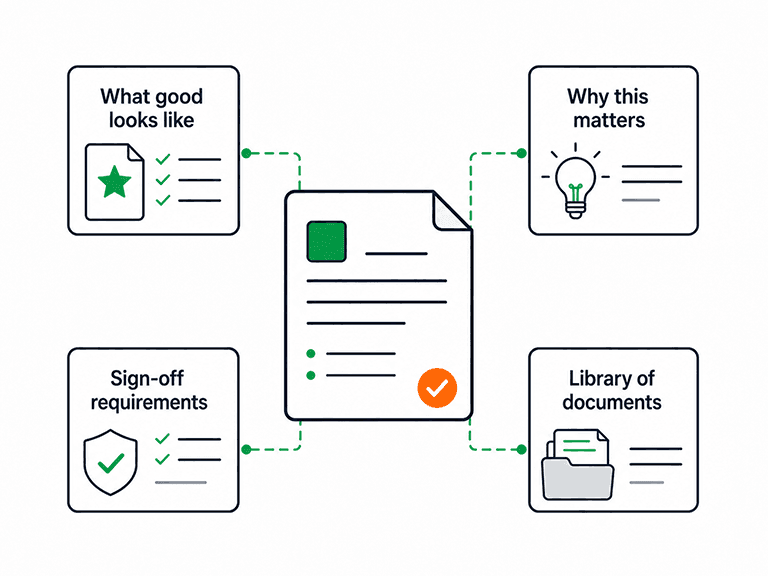
A gensudo document surrounded by four cards including what good looks like, why this matters, sign-off requirements and library of documents

Every template arrives with a seasoned opinion attached

Templates in Gensudo are not blank forms. Each one explains why this document matters at this point in the lifecycle, states its sign-off requirements, and describes what good looks like - with per-section prompts that keep the writing purposeful. For a product leader without a full support team, it is the digital mentor looking over your shoulder.

  • Why-this-matters-now context on every template
  • Sign-off requirements stated up front, not discovered late
  • What-good-looks-like guidance plus per-section prompts
  • Role-shaped libraries: 83 templates for a Product Manager, 84 for a Creative Director etc.

Controls and honest limits

The workspace structures the work and advises on it — the working, and the deciding, stay yours.

The structure is included

Templates, lifecycle phases, the workflow graph and all five views are included with every plan and do not use AI credits. Credits are only used for AI drafting, research, review, critique and enrichment.

Compare Pro, Max and Team plans

Guidance, not a conveyor belt

Needs-before and unblocks-next are advice from the graph, not locks on your work. Skip a dependency knowingly and the workspace lets you — it exists to inform sequencing decisions, never to make them.

What it will not do

The workspace will not run your process for you or declare a phase complete on your behalf. Sign-off requirements are stated on each template precisely because approval is a human judgement.

How documents earn trust

Bring your own templates

The 382-template library is the starting point, not a boundary. Create custom templates with your own sections, assign them a role, phase and type, and mark them as org-approved standards — the AI drafts them just like built-in ones.

The workspace in practice

What are the eight lifecycle phases?

In order: Discover, Validate, Plan, Define, Build, Launch, Optimise, and Scale or Sunset. Each phase holds the governed templates that stage of a product's life actually calls for — from a Product Discovery Brief at the start to a Product Sunset Assessment and Product Retirement Business Case at the end.

How does the workflow graph decide what comes next?

It does not decide — it informs. The graph's 2,102 dependency edges across 39 stages record which documents each piece of work needs before it and which it unblocks next. You see the recommended sequence on every document and remain free to depart from it; the graph makes the trade-off visible rather than making the call.

Are the templates the same for every role?

No — the 382 templates are organised by role as well as phase. A Head of Product works from 72 templates, a Product Director 66, a Product Manager 83, a Product Owner 77 and a Creative Director 84, each library shaped to that role's actual remit across the eight phases.

Does using the workspace consume AI credits?

No. Phases, templates, template guidance, the workflow graph and the dashboard, kanban, timeline, calendar and flow views are all part of the workspace at no credit cost. Credits are only spent on AI actions you invoke — drafting, editorial review, critique and enrichment — and failed AI requests are never charged.

Can my team work in the workspace together?

Yes. Team Standard (£25 per seat per month) and Team Premium (£59 per seat per month) let colleagues collaborate across shared projects and documents, participate in review cycles and manage blockers in one workspace. For individual product leads working independently, Pro and Max provide the same structured product-lifecycle workspace without team collaboration.

Is the template guidance a substitute for product experience?

It is a support for it. The guidance — why this matters now, sign-off requirements, what good looks like — encodes structure an experienced product organisation would provide, which is exactly what a leader without a full support team is missing. Judgement about your product, your market and your users remains yours; the workspace makes sure it is applied in the right order, to the right documents.
Bring the whole lifecycle into one structured place

Get started with a full project - eight phases, your role's templates, and a graph that always knows what is next.

Get Started